Social Preview Inspector
See the title, description, canonical URL and share image a page really offers to link previews, with warnings.
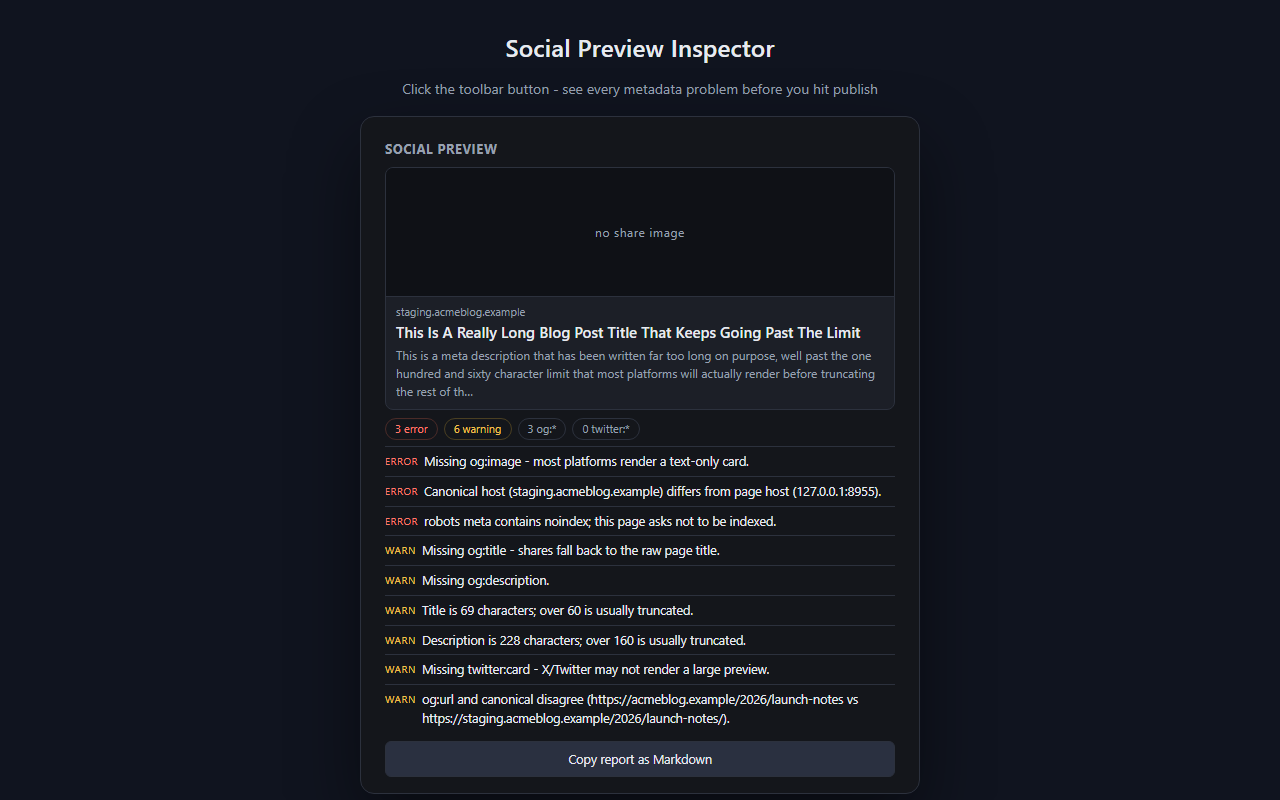
Paste-and-pray no more: open the page, click, and see exactly what chat apps and social networks will show, plus 14 warning rules for missing or wrong tags. Runs locally, so private and unpublished pages are fine.
Privacy: runs entirely in your browser, on the active tab, only when you click. No account, no network requests, no data collected.
Get it for Firefox Not on the Chrome Web Store yet
The Firefox version is live on addons.mozilla.org. A Chrome Web Store listing is planned but not published; this page will link it when it exists.
In this guide What Social Preview Inspector does How to use it How it decides what a preview would show The fourteen checks Permissions it asks for, and why Limits Privacy Tips Questions and answers
What Social Preview Inspector does
You paste your own link into a chat or a post and the preview is wrong: no image, the wrong title, a cut-off description, or an address that points at a staging server. Social Preview Inspector shows you why. One click reads the metadata in the page's head, works out which values a link preview would actually use and lists every problem it finds.
Online preview debuggers need the page to be public and need you to hand over the URL. This extension reads the page already open in your tab, so it also works on localhost, on staging sites behind a login and on pages you have not published.
How to use it
- Open the page you want to check.
- Click the extension's toolbar button. The popup reads the page and shows a preview card with the resolved title, description and image.
- Read the warning list under the card. Problems are ranked, with errors above warnings.
- Fix the tags in your page, reload it and click the button again to confirm.
- Press Copy report as Markdown to put the whole report on the clipboard for an issue or a hand-off note.
How it decides what a preview would show
For each field the inspector prefers Open Graph tags, then Twitter card tags, then the plain fallbacks such as the title element and the meta description. A relative image address is resolved against the page address, the way a crawler would resolve it. The preview card is deliberately generic. Every platform draws link previews differently, so an imitation of one of them would mislead.
The fourteen checks
| Severity | Check |
|---|---|
| Error | The page has no title. |
| Error | The page has no description. |
| Error | There is no og:image. |
| Error | The canonical URL points at a different host from the page. |
| Error | The share image is not served over https. |
| Error | A robots tag tells crawlers not to index the page. |
| Warning | og:title is missing. |
| Warning | og:description is missing. |
| Warning | twitter:card is missing. |
| Warning | The title is longer than 60 characters. |
| Warning | The description is longer than 160 characters. |
| Warning | There is no canonical URL. |
| Warning | The share image address is relative. |
| Warning | og:url and the canonical URL disagree. |
Permissions it asks for, and why
| Permission | Why it is needed |
|---|---|
| activeTab | Allows the extension to read the current tab once you have clicked its button. It has no standing access to any site. |
| scripting | Lets it run a small collector in that tab, which reads the title, the meta tags, the canonical and icon links and the page language. |
No storage permission is requested, so the extension has nowhere to keep anything, and there is no background script. Its Firefox manifest declares no data collection.
Limits
- It never downloads the share image. The image is shown by the browser, and its file size and dimensions are not checked.
- It does not read JSON-LD or other structured data, and it does not test oEmbed.
- It cannot tell you what a particular platform has cached for a link you shared earlier.
- It reads the page as it is in your tab. Tags that scripts add after loading are included, and tags a server would send only to crawlers are not.
Privacy
Nothing is stored and nothing is transmitted. The collector runs only when you click, hands a plain object to the popup, and that object disappears when the popup closes. The Markdown report goes to your clipboard only when you press the copy button.
Tips
- Check the canonical first on a staging site. A canonical that still points at the staging host is flagged as an error.
- Give every page an og:image with an absolute https address. That one tag clears three of the fourteen checks.
- Keep titles to 60 characters and descriptions to 160 to avoid the two length warnings.
- Run it on a page template once, then on one real page of each type, since templates often hide missing fields.
- Paste the Markdown report into the ticket when a fix belongs to someone else. It lists each problem by name.
Questions and answers
Does it work on pages that are not public?
Yes. It reads the page in your own tab, so localhost, staging and pages behind a login all work.
Does it fetch my share image?
No. The extension makes no network requests. The browser displays the image in the preview card.
Will the card look exactly like a preview on a given social network?
No. The card is generic on purpose, because each platform renders previews in its own way.
Can it see pages I have not clicked it on?
No. It has no host permissions and acts only on the tab where you click its button.