Contrast Audit Overlay
Outline every text element on a page that fails WCAG AA or AAA contrast, and export the table as CSV.
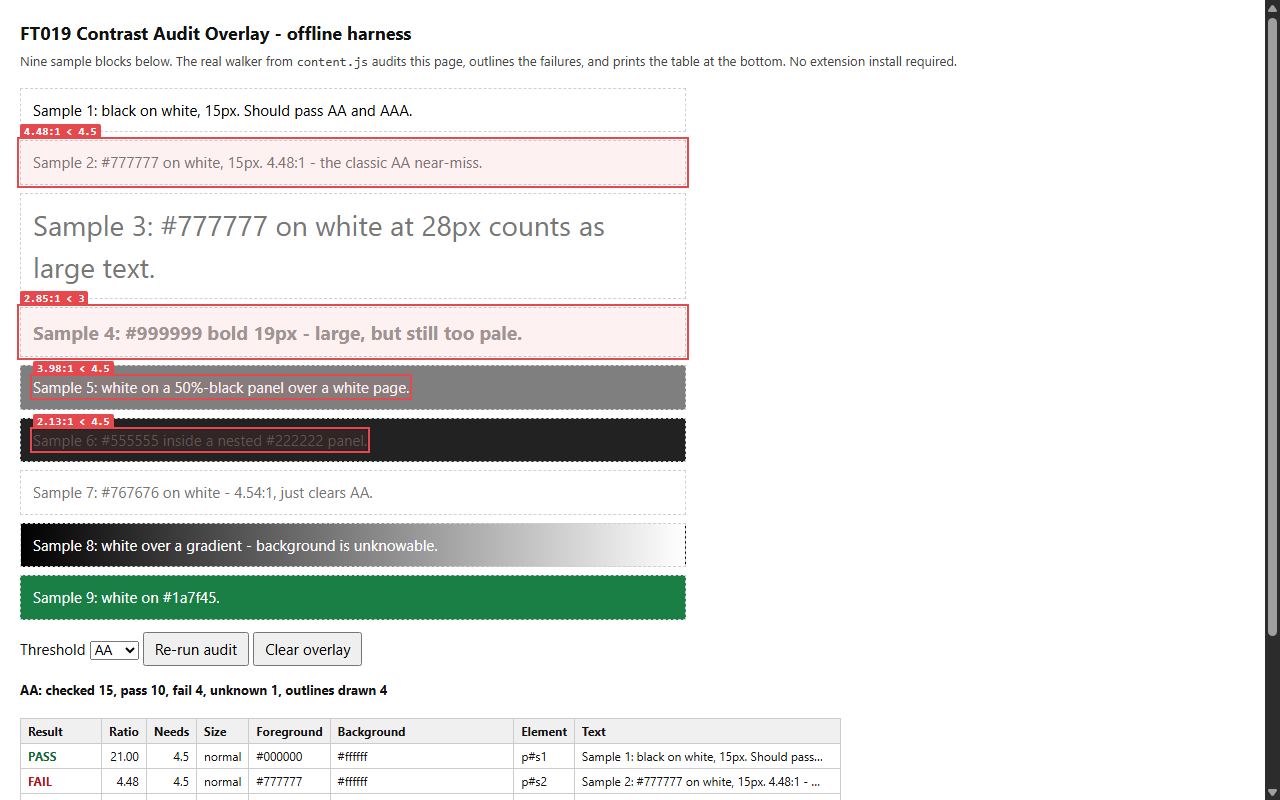
One click on any page: each piece of text is measured against the background it actually sits on, failures are outlined with their ratio, and the table of measurements can be exported. Works on staging and localhost pages because nothing leaves your browser.
Privacy: runs entirely in your browser, on the active tab, only when you click. No account, no network requests, no data collected.
Get it for Firefox Not on the Chrome Web Store yet
The Firefox version is live on addons.mozilla.org. A Chrome Web Store listing is planned but not published; this page will link it when it exists.
In this guide What Contrast Audit Overlay does How to use it The thresholds it applies What is in the CSV Permissions it asks for, and why What it cannot measure Privacy Tips Questions and answers
What Contrast Audit Overlay does
Contrast Audit Overlay answers a question front-end developers, designers and testers ask constantly: does this page pass the WCAG contrast requirement? It walks every visible element that owns text, works out the color actually behind that text, computes the contrast ratio and draws an outline on the page around the failures, up to 300 of them, with the ratio in a small badge.
The background step is what sets it apart from a quick eyedropper check. Text often sits on an element whose own background is transparent. The extension climbs through the parent elements and blends any translucent layers until it reaches a solid color, so text on a tinted panel or a nested dark card is measured against what you really see.
How to use it
- Open the page you want to check and click the extension's toolbar button.
- Choose a threshold in the popup: WCAG AA or WCAG AAA.
- Press Run audit. Failures are outlined on the page, and the popup shows how many text elements were checked, passed, failed and could not be determined, followed by the 25 worst failures.
- Press Export CSV to save the table of measurements, which holds up to 2,000 rows.
- Press Clear overlay to remove the outlines. Reloading the page removes them as well.
The thresholds it applies
| Level | Normal text | Large text |
|---|---|---|
| WCAG AA | 4.5 to 1 | 3 to 1 |
| WCAG AAA | 7 to 1 | 4.5 to 1 |
Large text follows the WCAG definition: at least 24 pixels, or at least about 18.7 pixels when bold. The extension reads each element's size and weight and applies the matching requirement automatically.
What is in the CSV
The export has one row per measured text element, for the first 2,000 elements the audit measures, with ten columns: status, level, ratio, required ratio, pass or fail, whether the text counted as large, foreground color, background color, a CSS selector for the element and a sample of its text. The file is created inside the browser and saved through the browser's normal download flow.
Permissions it asks for, and why
| Permission | Why it is needed |
|---|---|
| activeTab | Grants access to the one tab you are looking at, and only after you click the toolbar button. Without a click the extension can see no page at all. |
| scripting | Lets the extension run its measuring script in that tab, so it can read computed text and background colors and draw the outlines. |
That is the complete list. It requests no access to all websites, no storage and no browsing history, and it has no background script. The Firefox package also declares that it collects no data.
What it cannot measure
- Text over a background image is reported as unknown. Guessing would need a screen capture permission that the extension deliberately does not request.
- Opacity set on a parent element is not blended in. Only an element with opacity zero is skipped.
- Text generated by ::before and ::after, text drawn on a canvas and anything inside a cross-origin frame are not checked.
- Text shadows, blend modes and filters are ignored.
- Very large pages are capped. The audit keeps the first 2,000 measurements, which is what the counts in the popup and the CSV are built from, and it outlines at most 300 failures on the page.
- It reports ratios only. It does not propose replacement colors.
Privacy
There is no network code in the extension. The audit runs inside the page, the results live in the popup's memory and they are gone when the popup closes. Because nothing is sent anywhere, it works just as well on localhost, staging servers and pages behind a login as on public sites.
Tips
- Audit each state of a page separately. Open the menu, the dialog or the dark theme first, then run the audit again.
- Start with AA. Fix those failures, then switch the threshold to AAA to see how much headroom is left.
- Treat unknown as a to-do list, not a pass. Those are mostly elements over images, and they need a manual check.
- Use the selector column of the CSV to find each failing element in your stylesheet.
- Sort the CSV by ratio to fix the worst offenders first, since the popup only lists the top 25.
Questions and answers
Does it send my page anywhere?
No. It makes no network requests. Everything is computed in your browser.
Does it run on every page I visit?
No. It does nothing until you click its button, and then only on the tab in front of you.
Why are some elements marked unknown?
Their background could not be resolved to a solid color, usually because the text sits on an image.
Which Firefox version does it need?
Firefox 140 or later.