How to play Shadow Stack
Drop pieces so their shadows match the target silhouette.
In this guide What Shadow Stack is How to play The overhang rule Winning, losing and scoring Keyboard controls What is saved Tips Questions and answers
What Shadow Stack is
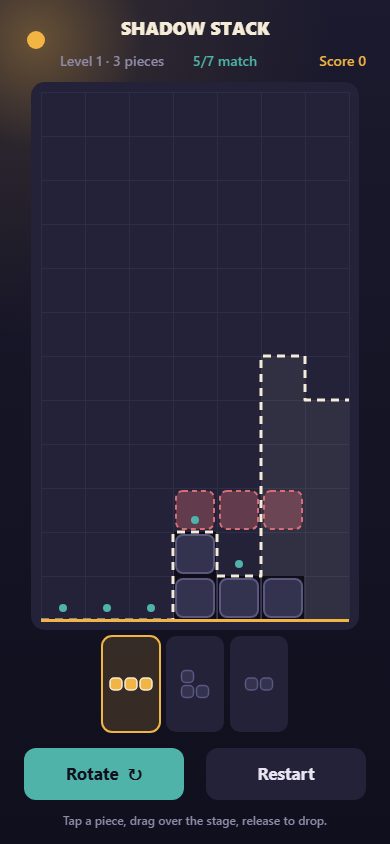
Shadow Stack is a browser puzzle about outlines. A dashed cream line, the target skyline, is drawn across a stage seven columns wide. You are handed a small set of block pieces and have to drop them so that the top edge of your stack follows that line exactly. Only the skyline counts. Whatever gaps are left underneath do not matter.
It is not a reflex game. Nothing falls until you release it, there is no timer, and every drop is a small planning decision.
How to play
- Tap a piece in the tray at the bottom to select it. The hand contains dominoes, three-block pieces and L, T, S and square shapes.
- Tap the selected piece again, or press the Rotate button, to turn it.
- Press on the stage and drag to choose a column. An amber ghost shows where the piece will land. The ghost turns rose if the drop would rise above the outline.
- Release to drop. The piece falls straight down and rests on whatever is highest beneath it.
- Repeat until every column is exactly as tall as the outline. The stage shows how many columns already match.
The overhang rule
A piece stops as soon as any part of it touches the stack, so a wide piece can bridge a hollow and leave empty space under its overhang. That is allowed and often necessary. It is the difference between this game and a tangram, where every gap must be filled, and it is why the order of your drops matters as much as their positions.
Winning, losing and scoring
You win a level the moment every column height equals the outline. The win pays 100 points times the level number, plus 25 for every piece still in your hand.
You lose if any column rises above the outline, or if you run out of pieces without a match. A loss lets you retry the same level, and the Restart button resets it at any time. There is no undo: a dropped piece stays dropped.
Each outline is produced by secretly dropping the very pieces you are given, so every level can be solved with its hand. Level 1 gives you four pieces, and each level adds one more up to a hand of eight.
Keyboard controls
| Key | Action |
|---|---|
| 1 to 8 | Select a piece from the tray |
| Tab | Cycle to the next piece |
| Left and Right arrows | Move the ghost between columns |
| Up arrow or R | Rotate the selected piece |
| Space, Enter or Down arrow | Drop |
| Space or Enter on the result screen | Next level or retry |
What is saved
Nothing. The game keeps no data in your browser and sends nothing anywhere. Your score and level live in the page and are gone when you close or reload it.
Tips
- Start with the lowest parts of the outline. A low column is easy to overshoot later, once taller neighbors make wide pieces rest too high.
- Trust the ghost color. Rose means the drop would break the outline, which is an instant loss.
- Use overhangs on purpose. A flat piece laid across a dip finishes several columns at once and wastes nothing, because the hollow underneath is free.
- Rotate before you drag. A piece on its side and the same piece upright change very different sets of columns.
- Save small pieces for last. A domino can fix a single short column at the end, and a large piece cannot.
- Look for a solution that leaves a piece over. Every unused piece is worth 25 points.
Questions and answers
Do I have to fill every gap?
No. Only the height of each column is compared with the outline. Empty space under an overhang is fine.
Can I take back a drop?
No. There is no undo. You can restart the level, which gives you the same outline and the same hand again.
Is every level solvable?
Yes. The outline is generated from the same pieces you are dealt.
Is my progress saved?
No. Nothing is stored, so a reload starts from level 1.