How to play Rail Switch Rush
Trains run in real time; flip the crossovers before they meet.
In this guide What Rail Switch Rush is How to play Misses and crashes Scoring How the levels ramp Keyboard controls Tips Questions and answers
What Rail Switch Rush is
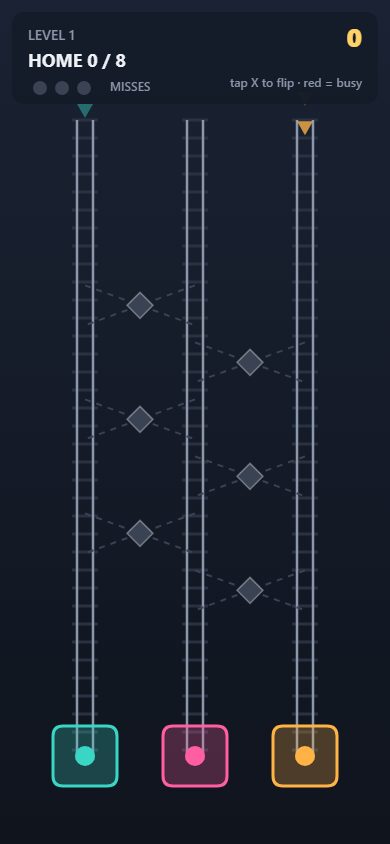
Rail Switch Rush is a real-time routing game for the browser. Trains enter at the top of the screen on parallel lanes and run downward without stopping. Each train is painted the color of the station it has to reach at the bottom. Between the lanes sit X-shaped crossovers, and flipping them is the only thing you can do. Every failure has a visible cause: the wrong crossover, a late flip, or a fast train sent in behind a slow one.
How to play
- Look at the arrows above each lane to see what is about to enter, and at the colored rings at the bottom to see which station is where.
- Tap or click the diamond knob on a crossover to switch it on or off.
- While a crossover is on, any train that passes it moves over to the neighboring lane. It works in both directions at once, so a train coming down the other lane swaps too.
- A knob that shows red is busy: a train is on the crossover or about to enter it, and the flip is refused.
- Deliver every train on the schedule to finish the level.
Misses and crashes
A train that arrives at a station of the wrong color costs one of three misses, shown as lamps in the top panel. The third miss loses the level.
A crash is worse. Fast trains carry a chevron marker and run about one and a half times as fast as slow ones. If two trains touch on the same lane, the level is lost at once, whatever your miss count. The single exception is two trains swapping through the same crossover at the same moment, which is allowed.
Scoring
- 100 points for each train delivered to the right station.
- 50 more if that train was a fast one.
- 100 bonus points for each miss you did not use, awarded when the level is cleared.
- The best score of your session is shown on the title screen. It is kept in the page only and is gone when you close or reload the tab.
How the levels ramp
| Setting | Level 1 | Later |
|---|---|---|
| Lanes | 3 | 4 from level 3 |
| Trains on the schedule | 8 | 2 more each level, up to 20 |
| Time between trains | About 2 seconds | Shrinks each level, down to 0.9 seconds |
| Share of fast trains | About 1 in 6 | Rises each level, up to half |
| Train speed | Slowest | Rises each level up to level 12 |
The ramp never ends, and there is no level select and no pause.
Keyboard controls
Number keys 1 to 9 flip the crossovers in order, and Space or Enter starts a level or continues to the next.
Tips
- Read the incoming arrows, not the trains already on the board. By the time a train is near a crossover the knob may be red.
- Turn a crossover off again after use. A crossover left on will swap the next train too, whether you want it to or not.
- Never route a fast train into a lane directly behind a slow one. A wrong station costs a miss, and a rear-end collision costs the level.
- When two trains need to trade lanes, one crossover does both jobs if they meet at it, because the swap works in both directions.
- Spend a miss deliberately when the alternative is a crash. Two misses still leave you alive.
- Clean levels are worth extra. Three unused misses add 300 points, as much as three deliveries.
Questions and answers
Why will the crossover not flip?
Its knob is red, meaning a train is on it or about to enter it. Wait until the train has passed.
Do I lose when a train reaches the wrong station?
Not at once. It costs one of three misses. A collision on a lane, however, ends the level immediately.
Can I pause?
No. Trains keep running once a level has started.
Is anything saved?
No. The game stores nothing in your browser. The session best lasts until the page is closed.