How to play Orbit Locksmith
Rotate the rings, line up the tumblers, open the lock in as few moves as you can.
In this guide What Orbit Locksmith is How to play Keyboard controls Scoring How the locks get harder Tips Questions and answers
What Orbit Locksmith is
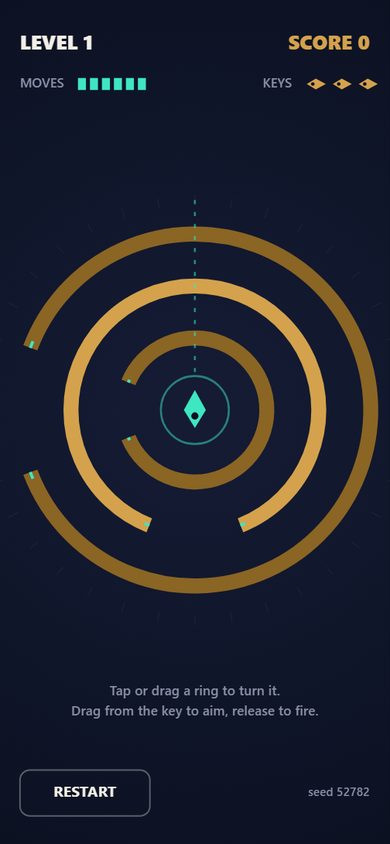
Orbit Locksmith is a browser puzzle with a planning phase and a single shot. A lock made of concentric brass rings appears, scrambled. Each ring has one gap. Spend a limited number of moves turning the rings until every gap lies on one straight line out from the center, then launch the key along that line. If the key clears every ring, the lock opens and the next one is harder.
The line can point in any direction. There is no fixed slot to aim for, which means a clever angle can rescue an alignment that is not quite the one you planned.
How to play
- Tap the right half of a ring to turn it one step clockwise, or the left half to turn it counterclockwise. You can also drag along a ring to spin it in steps. Every step uses one move from the budget shown at the top.
- Watch the links. From the second lock onward rings are geared together, and turning one ring turns its partner the opposite way.
- When the gaps line up, drag from the key in the hub to aim along the line and release to fire. A plain tap on the key fires along the current aim.
- The key flies outward. If it meets a ring away from its gap, that ring flashes coral and you lose one of your three keys. If it escapes the outer ring, the lock is open.
Keyboard controls
On a computer the arrow keys aim, Space or Enter fires and R restarts. The RESTART button on screen replays the current lock from its starting position.
Scoring
Opening a lock pays 100 points times the level number, plus 15 for every move you did not use and 30 for every key you still hold. Score carries from lock to lock. Running out of keys ends the run. The game keeps nothing after you close the tab: there is no saved high score.
How the locks get harder
| Level | Rings | Positions per ring | Links |
|---|---|---|---|
| 1 | 3 | 8 | None |
| 2 and 3 | 3 or 4 | 8 | Each ring is linked to the next one out |
| 4 and 5 | 4 or 5 | 12 | Each ring is linked to the next one out |
| 6 and 7 | 5 or 6 | 12 | Random partners |
| 8 and up | 6, then 7 | 16 | Random partners |
The move budget is the number of moves used to scramble the lock plus a few spare: three spare on the first two levels and two after that. The lock is scrambled by turning rings from a solved position, so every lock can be solved within its budget. Gaps also get narrower as the level rises.
Tips
- Before you turn anything, check whether most gaps already share a line. Moving the one or two outliers is cheaper than moving everything to a new line.
- Remember that a linked partner moves the other way. One turn can close the distance between two gaps by two steps, or open it by two.
- On chain-linked locks, work from the inside ring outward. The outermost ring has no partner beyond it, so its turns disturb nothing.
- Count before you commit. Unused moves are worth 15 points each and unused keys 30.
- Aim carefully on later locks. Gaps become narrower than one step of the ring, so a line that looks right can still clip an edge.
- If a shot fails, look at which ring flashed. That is the only one you need to fix, if you have moves left.
Questions and answers
Do the gaps have to line up at the top?
No. Any line out from the center works, as long as every gap is on it.
What happens when I run out of moves?
The rings can no longer be turned. You can still aim and fire with whatever alignment you have.
Is my score saved?
No. The game stores nothing in your browser. The score lasts until you close or reload the page.
Does it work on a phone?
Yes. It is a portrait game built for touch, and it also runs in a desktop browser with mouse or keyboard.